

Week Nine
- Robert Allen
- Dec 10, 2023
- 3 min read

At the end of last week, it was decided that Jack would be responsible for implementing Wwise. However, when he tried to he was unable to get the unity project open. Therefore, i decided to take over until he was able to fix it. Here is what i done to implement Wwise into unity.

The first step was to collect a build of the game before integrating the middleware with the AudioKinetic Launcher. During this stage, it is critical that I select the correct Unity version, as selecting the incorrect one could result in the build failing completely. I decided to use Wwise version 2021. 1. 13. 8 for this project because it is the version that the entire audio team has the most experience with and hasn't had any game breaking bugs during our time with it.
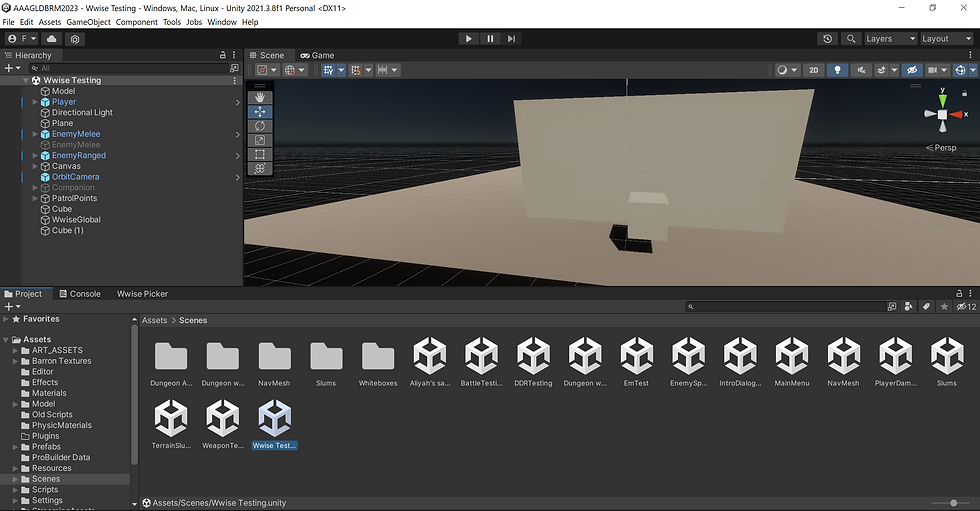
When I reopened the Unity project, a new tab called "Wwise Picker" appeared. This is very encouraging because it confirms that the project was successfully implemented using Wwise. With that said, I was unsure how the game's current state would handle Wwise. So I duplicated the "NavMesh" scene and renamed it "Wwise Testing". This ensured that I would have a scene with character movement and combat without breaking any major scenes in the game.

After successfully locating the Wwise project with the Unity project, I concentrated on testing and implementing sound. To put it to the test, I used a burning SFX that I created as part of the demon fireball. Adding SFX to Wwise is simple; simply drag and drop them in. Once in Wwise, I renamed it "Burn Test" and colour coded it red to help keep the Wwise project organised and visible to those who may not be as familiar with the middleware.

The next step in incorporating sound into the build was to create events. Events in Wwise function as commands that can do a variety of things to sounds, such as play, pause, stop, increase and decrease volume, and so on. I kept it simple for this test, and the sound will play once the event is triggered in Unity. I had to create a soundbank in order for Unity to find both the sound and the event. Soundbanks are a type of file that contains all events, sound files, and sound structure. It is critical to keep these up to date because without them, Unity will miss any changes you make within Wwise. I returned to the Unity project after ensuring that the "Play_Burn_Test" event was present in the new soundbank I had named "Main."

After refreshing the project, all of the changes I had made in Wwise were now visible in the Wwise Picker. However, in order for them to work within the project, I would need to make some changes to the scene.

To get the sound working in game, I first added a new cube that will serve as the audio source. The green rectangle that surrounds the cube is the box colider, which serves as the sound's trigger. This means that the event will be triggered once the player enters that area, causing the sound to play. It was critical to keep the cube floating during this process because otherwise the box collider would touch the floor, causing the sound to play indefinitely.

I added the "AkAmbient" script to the Cube's properties, which is used when you want to start a Wwise event within a Unity trigger. For trigger on, I chose AkTriggerEnter, which means that the event will be triggered once the player enters the box collider area. The name at the bottom refers to the name of the event I hope to initiate. Because Wwise was implemented, I was able to easily drag and drop the event from the Wwise picker.

The final step was to add the "AkBank" script to the project. Despite the fact that I created the soundbank in Wwise and could see it in the Wwise picker in Unity, the soundbank has yet to be loaded into the scene. Without it, none of the other things we'd done would have made a difference. I set load on to start, which means the soundbank will be loaded alongside the scene. The same thing will happen during the unload, where both the scene and the soundbank will unload simultaneously. Like the previous script, "Name" refers to the name of the soundbank that I created in Wwise. With this completed, it was now time to test it.
Above is a clip of the sound playing once i enter the cube’s collider. With this being sucessful i spent the week getting as many sounds into the Wwise project ready to be used in the real thing.


